
How to Install Skills for Manus
What is Manus?
Manus is a general-purpose autonomous AI agent that handles entire projects from concept to completion without direct human intervention. Originally developed by Chinese startup Monica.im and launched in March 2025, Manus was acquired by Meta for an estimated $2-3 billion in December 2025.
Unlike coding assistants that respond to individual prompts, Manus can independently handle:
- Research — Browse the web, gather information
- Planning — Break problems into sub-tasks
- Coding — Write, test, and debug code
- Deployment — Push to production
- Iteration — Monitor and improve
Multi-Agent Architecture
Manus uses a coordinated multi-agent system:
| Agent | Role |
|---|---|
| Planner | Breaks problems into manageable sub-tasks |
| Executor | Carries out the plan using tools and APIs |
| Verifier | Validates results and ensures quality |
This architecture allows Manus to work autonomously for extended periods—you describe what you want, and Manus delivers.
Cloud-Based Operation
Manus runs entirely in the cloud. You don't need to keep your computer on—it can:
- Browse the internet
- Read and write files
- Run code
- Interact with external services
- Work 24/7 on long-running projects
Is Manus Free?
Manus offers a freemium model:
| Tier | Price | Limits |
|---|---|---|
| Free | $0 | Basic usage with rate limits |
| Pro | TBD | Higher limits, priority processing |
| Enterprise | Custom | Unlimited, dedicated support |
After Meta's acquisition, pricing details may change. Check Monica.im or Meta AI for current information.
Why Use Skills with Manus?
Skills provide Manus with structured domain expertise:
- Consistent workflows: Prevent Manus from "freelancing" with unpredictable approaches
- Proven patterns: Best practices for specific tasks
- Quality control: Security-scored and community-rated skills
- Cross-platform: Same skills work in Claude Code, Codex, OpenClaw, and more
Without skills, Manus might take creative but inconsistent approaches to tasks. Skills channel its autonomy into reliable, repeatable workflows.
How to Install Skills on Manus
Installing skills on Manus is straightforward. Here's how to get started:
Step 1: Open Skills Settings
- Click Settings in the left sidebar
- Select Skills from the menu
- Click the + Add button in the top right
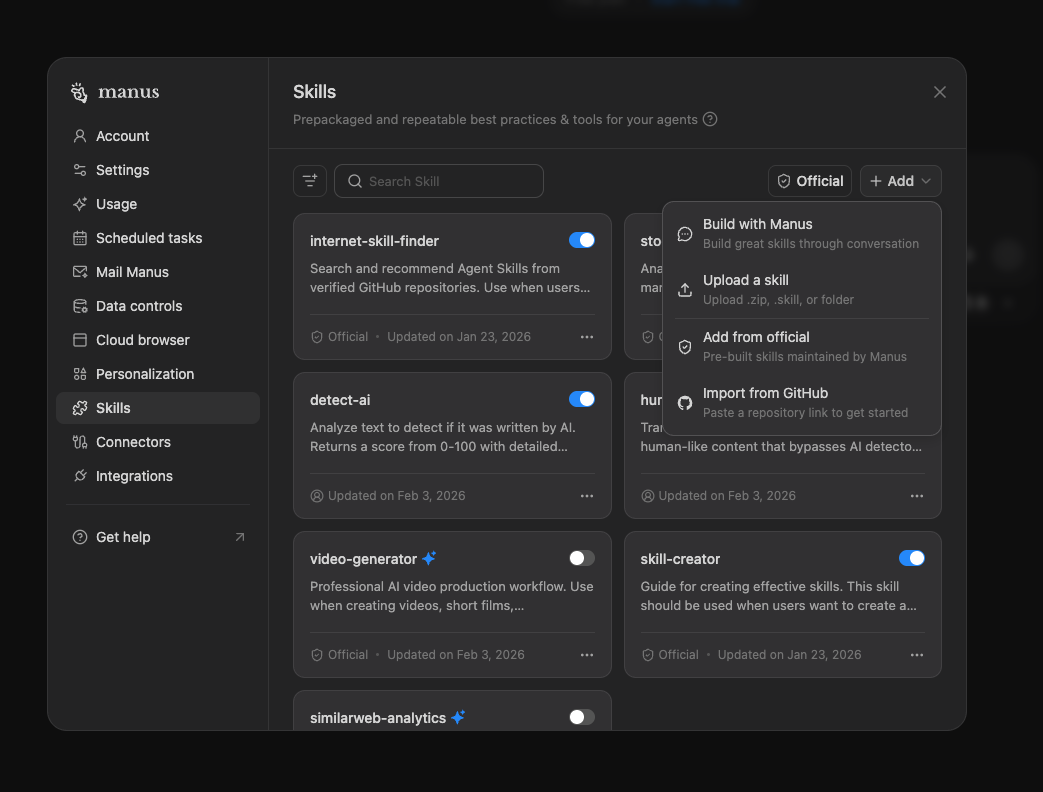
Step 2: Choose Installation Method
Option A: Import from GitHub (Easiest)
- Click Import from GitHub in the dropdown
- Paste the skill's GitHub repository URL (e.g.,
https://github.com/agentskill-sh/ags) - Click Import
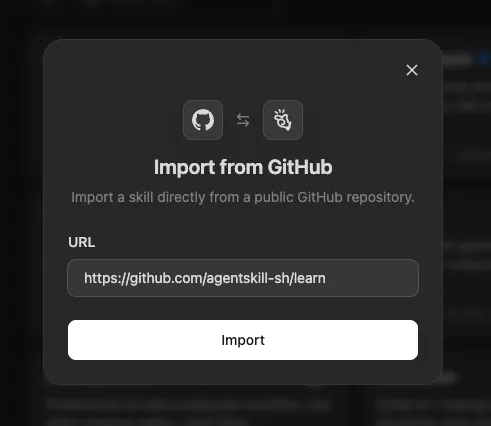
Option B: Upload ZIP File
- Download the skill ZIP from agentskill.sh
- Click Upload a skill in the dropdown
- Select your
.zip,.skill, or folder
Step 3: Use Your Skills
Once installed, invoke skills with the / command in the chat:
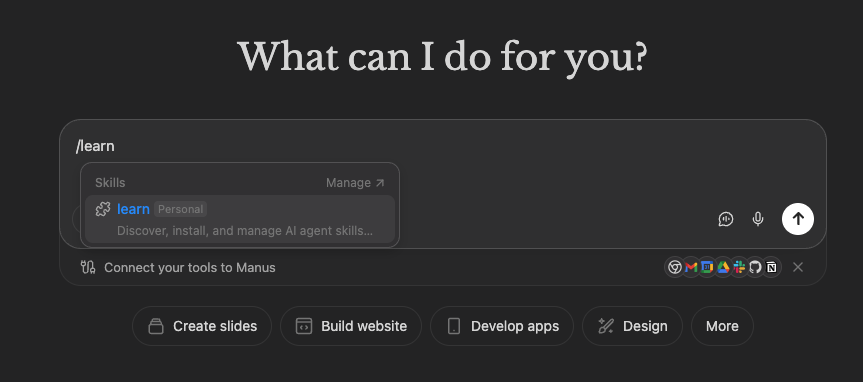
/learn                    # Invoke the learn skill
/seo-optimizer            # Run SEO analysis
/frontend-design          # Generate UI components
Skills appear in the autocomplete menu when you type /.
Popular Manus Skills
| Skill | Description | Installs |
|---|---|---|
| seo-optimizer | SEO, keyword research, content optimization | 10K+ |
| programmatic-seo | SEO pages at scale | 6K+ |
| frontend-design | Production-grade UI components | 8K+ |
| cold-email | Cold emails that get replies | 9K+ |
| skill-creator | Create your own Agent Skills | 4K+ |
Manus vs Claude Code vs OpenClaw
| Feature | Manus | Claude Code | OpenClaw |
|---|---|---|---|
| Maker | Meta (via Monica.im) | Anthropic | Peter Steinberger |
| Operation | Cloud-based | Local | Local |
| Autonomy | Full (end-to-end projects) | Task-based | Task-based |
| Interface | Web/API | Terminal | Messaging apps |
| Open source | No | Partial | Yes |
| Skills format | SKILL.md | SKILL.md | SKILL.md |
Manus excels at autonomous, long-running projects. Claude Code and OpenClaw are better for interactive, task-by-task work.
FAQ
Is Manus free?
Manus has a free tier with rate limits. Paid tiers offer higher usage and priority processing. After Meta's acquisition, pricing may evolve—check Monica.im or Meta AI for current details.
How do I add skills to Manus?
Go to Settings → Skills → + Add. The easiest method is Import from GitHub — just paste the skill's repository URL. Alternatively, download a skill ZIP from agentskill.sh and use Upload a skill. Once installed, invoke skills with /skillname in the chat.
Can Manus auto-discover skills?
Skills must be explicitly installed via Settings → Skills → + Add. Once installed, Manus makes them available in the / command menu. The Planner Agent can then match installed skills to relevant tasks.
What's the difference between Manus's tools and skills?
- Built-in tools: Core functions like web browsing, file I/O, code execution
- Skills: Optional, specialized workflows you add (SEO, cold emails, etc.)
Tools are always available. Skills are modular and user-installed.
Do skills work the same in Manus as Claude Code?
Both use SKILL.md, so skills are portable. However:
- Claude Code runs locally with file system access
- Manus runs in the cloud with web-based tools
Test skills in your target environment to ensure compatibility.
Who owns Manus now?
Meta acquired Manus (Monica.im) in December 2025 for $2-3 billion. Meta will continue operating the service and integrate the technology into products like Meta AI.
Sources: